
ABC Inventory and Reorder Points: Avoid Stockouts Without Tying Up Cash
Rank items by annual usage value to decide which ones need close control, then set safety stock and reorder points from usage and lead time, with worked examples you can rebuild in Excel.

In this article
A shop or factory with hundreds of products usually has two problems at once. A few best sellers run out and cost you sales, while many other items sit in the warehouse for a year, tying up cash in stock that doesn't move. The usual cause is managing every item the same way and reordering when stock "feels low."
This article gives you two tools that work together: ABC analysis, to decide which items deserve the most attention, and the reorder point with safety stock, to decide when to order. The worked examples can be rebuilt in Excel.
ABC: rank items by annual usage value
The idea is that a small number of items usually account for most of the year's usage or sales value. So you don't rank by unit count. You rank by annual usage value: units used or sold per year × unit cost. The steps:
- Pull the last 12 months of sales or usage for every item (SKU).
- Multiply by unit cost to get annual usage value.
- Sort from largest to smallest and calculate the cumulative share.
- Draw the lines. For example, the items that together make up roughly 60–80% of value are A, the next tier is B, and the rest are C.
There is no fixed formula for the cutoffs. MIT's logistics course materials state plainly that these classes are arbitrary. What matters is that each class actually gets managed differently.
Illustrative example
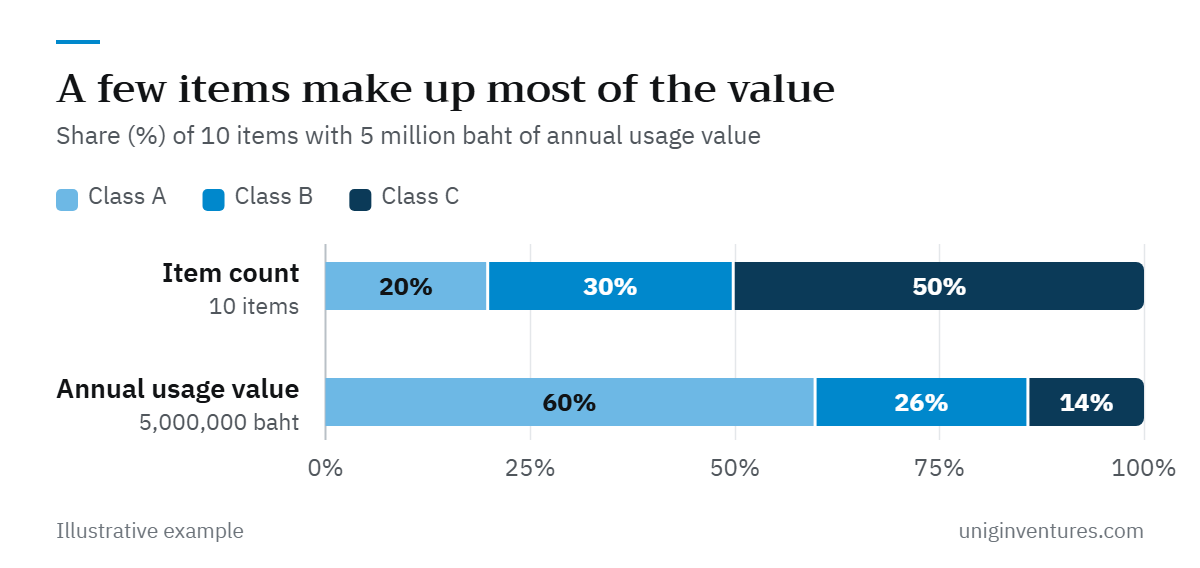
A building materials shop carries 10 items with total annual usage value of 5,000,000 baht.
| Item | Annual value | Cumulative | Cumulative share | Class |
|---|---|---|---|---|
| 1 | 1,800 | 1,800 | 36% | A |
| 2 | 1,200 | 3,000 | 60% | A |
| 3 | 600 | 3,600 | 72% | B |
| 4 | 400 | 4,000 | 80% | B |
| 5 | 300 | 4,300 | 86% | B |
| 6–10 | 700 | 5,000 | 100% | C |
The first two items, 20% of the item count, make up 60% of value. The three B items make up 26%, and the five C items, half of all items, make up only 14%.
How to manage each class
| Control | Class A | Class B | Class C |
|---|---|---|---|
| Review reorder points | Weekly or every two weeks | Monthly | Quarterly |
| How to set reorder points | Formula, item by item | Formula, set in the system | Simple rules such as two-bin or min-max |
| Cycle counts | Monthly | Quarterly | Once or twice a year |
| Supplier work | Negotiate price and lead time, line up a backup source | Review annually | Consolidate with fewer suppliers |
One caution: ABC only looks at value. Some cheap items are critical, such as a spare part that stops a machine, or a product that a major customer always buys alongside an A item. Upgrade items like these by exception.
Reorder point: how low before you order
The reorder point is the stock level at which you must place an order so the new batch arrives before the old one runs out. Compare it with your inventory position: stock on hand, plus stock on order but not yet received, minus stock already committed to customers. Not on-hand stock alone.
Reorder point = average demand during lead time + safety stock
Average demand during lead time = average daily usage × lead time (days)
Safety stock = k × standard deviation of daily usage × √lead time
The factor k comes from the cycle service level you want, meaning the probability of not running out in a given order cycle. Assuming normally distributed demand, common values are 90% → 1.28, 95% → 1.65 and 99% → 2.33. In Excel, use =NORM.S.INV(0.95). The √lead time term converts daily variability into variability over the whole lead time, which holds when each day's demand is independent.
Worked example for a class A item
Illustrative example: item 1 sells an average of 40 units a day with a daily standard deviation of 12 units. The supplier delivers 9 days after an order. Each unit costs 250 baht.
- Demand during lead time = 40 × 9 = 360 units
- Variability over the lead time = 12 × √9 = 12 × 3 = 36 units
| Service level | k | Safety stock (units) | Reorder point (units) | Cash in safety stock (baht) |
|---|---|---|---|---|
| 90% | 1.28 | 47 | 407 | 11,750 |
| 95% | 1.65 | 60 | 420 | 15,000 |
| 99% | 2.33 | 84 | 444 | 21,000 |
Safety stock is rounded up to whole units (1.28 × 36 = 46.1 → 47, 1.65 × 36 = 59.4 → 60, 2.33 × 36 = 83.9 → 84). Moving from 95% to 99% adds 24 units, about 40% more safety stock, to cut the chance of a stockout from 5 cycles in 100 to 1 in 100. The cost climbs faster the closer you get to 100%, so reserve high service levels for A items where a stockout really hurts, and accept lower levels where customers can wait.
Limits of the formula
- Unreliable lead times. If the supplier is sometimes late, this formula understates safety stock. Use a commonly seen longer lead time instead of the average, or track actual delivery times and use a formula that includes lead-time variability.
- Slow movers. Items that sell some days and not at all on others are not normally distributed, and the formula works poorly. Most C items are better served by simple rules.
- Seasonal or promoted items. A 12-month average is not next month's demand. Use a forecast for the coming period instead.
How much to order, and what it does to cash
The reorder point tells you when to order. How much depends on supplier minimums, volume discounts, freight per trip and warehouse space. Average stock on hand runs at roughly safety stock plus half the order quantity. Larger orders cut freight per unit but tie up more cash.
Every unit in the warehouse is cash that hasn't come back yet. Cut excess C stock and that money returns to working capital. To see the effect on the whole company's cash, look at the cash conversion cycle, and for valuing stock in your financial statements, see inventory accounting.
Where to start
- Pull 12 months of usage and unit costs for every item and build the ABC classes in Excel.
- Start with class A. Collect daily or weekly usage and the supplier's actual delivery times for at least the last three months.
- Calculate safety stock and reorder points. Set service levels by how much a stockout costs you, then enter them as alerts in your inventory system.
- Use simple rules for class C, and find items with no movement for over six months to discount, return to the supplier or stop ordering.
- Review every quarter. Items change class as sales shift, and lead times change with suppliers.
Neither tool needs expensive software. One Excel sheet, updated monthly, is enough to show where your inventory cash sits and which items need ordering today.