Sales Pipeline Forecasting: Weight Every Deal by Its Stage Probability
An 8 million baht pipeline may really be worth about 2.5 million. Define stages, set close rates from your own history, weight deals by month and work out how much new pipeline you need.

In this article
Ask a sales team how much they will close next month and you usually get one of two answers. One is a feeling based on the latest customer conversation. The other is the total of every deal in the pipeline, which looks reassuring because it is several times the target. Both can lead to bad decisions about hiring, purchasing and cash.
A weighted pipeline forecast fixes this by multiplying each deal's value by the close probability of the stage it is in, then grouping deals by the month they are expected to close. This article covers how to define sales stages, how to set close probabilities from your own data, a month-by-month worked example, how to calculate the new pipeline you need, and how to track forecast accuracy.
Why the pipeline total misleads
A pipeline total counts a deal after its first conversation the same as a deal waiting for a signature, even though most early-stage deals will never close and expected close dates tend to slip. The total tells you how much opportunity you have, not how much you will sell.
Weighted value = deal value × close probability of its stage, and the forecast for a month = the sum of weighted values of the deals expected to close in that month.
CRM software such as HubSpot does this calculation for you. HubSpot's documentation explains that the weighted amount is calculated by multiplying the total amount in each stage by the stage probability, and its default pipeline sets probabilities from 20% at Appointment Scheduled up to 90% at Contract Sent. Defaults like these are generic, not yours. Replace them with your own company's data once you have enough of it.
Define stages by what the customer does
Stage probabilities only mean something if everyone on the team moves deals by the same rules. Good rules rely on evidence from the customer, not on how the salesperson feels. The table shows an example for a B2B business that sells projects.
| Stage | A deal enters this stage when |
|---|---|
| 1. Qualified | The customer confirms a need, a budget and a timeline, and you know who makes the decision |
| 2. Discovery or demo done | The discovery meeting or demo has happened and the customer has asked for a quotation |
| 3. Quotation sent | You sent the quotation the customer asked for and have a follow-up meeting booked |
| 4. Negotiation | The decision maker has said yes and you are negotiating price, terms or the contract draft |
| Won | You have a purchase order or a signed contract |
A deal without evidence for the next stage stays where it is. Every deal needs a value, an expected close date and a next step with a date. A deal past its expected close date either gets a new date with a reason or is marked Closed Lost.
Set close probabilities from your own data
Pull every deal that ended in the past 12 months, won or lost, and count how many deals passed through each stage and how many were eventually won.
Stage close probability = deals won ÷ deals that reached the stage (closed deals only)
An illustrative example: a B2B company had 200 deals end during the year. All of them passed the qualified stage. Of these, 80 reached the demo stage, 50 received a quotation, 25 went into negotiation and 20 were won.
| Stage | Deals that reached it | Won | Close probability |
|---|---|---|---|
| Qualified | 200 | 20 | 10% |
| Discovery or demo done | 80 | 20 | 25% |
| Quotation sent | 50 | 20 | 40% |
| Negotiation | 25 | 20 | 80% |
With few closed deals, a handful of results can swing the numbers a lot, so pool several quarters and review every quarter. If you have no history yet, start with your software's defaults and replace them with your own numbers once enough deals have closed. If some groups of deals clearly close more easily than others, such as existing versus new customers, keep separate probabilities for each.
Weight and group by month: a worked example
The same company has a sales target of 1,000,000 baht a month. At the end of October it has 8 open deals worth 8,000,000 baht, about 2.7 times its three-month target. That looks like plenty.
| Deal | Stage | Value | Expected close | Probability | Weighted |
|---|---|---|---|---|---|
| A | Negotiation | 1,200,000 | Nov | 80% | 960,000 |
| B | Discovery or demo done | 800,000 | Nov | 25% | 200,000 |
| C | Negotiation | 400,000 | Nov | 80% | 320,000 |
| D | Discovery or demo done | 1,500,000 | Dec | 25% | 375,000 |
| E | Quotation sent | 500,000 | Dec | 40% | 200,000 |
| F | Discovery or demo done | 600,000 | Jan | 25% | 150,000 |
| G | Qualified | 2,000,000 | Jan | 10% | 200,000 |
| H | Qualified | 1,000,000 | Jan | 10% | 100,000 |
| Total | 8,000,000 | 2,505,000 |
Now add up by expected close month and compare with the target.
| Month | Full value | Weighted | Target | Gap |
|---|---|---|---|---|
| November 2026 | 2,400,000 | 1,480,000 | 1,000,000 | +480,000 |
| December 2026 | 2,000,000 | 575,000 | 1,000,000 | −425,000 |
| January 2027 | 3,600,000 | 450,000 | 1,000,000 | −550,000 |
| Total | 8,000,000 | 2,505,000 | 3,000,000 | −495,000 |
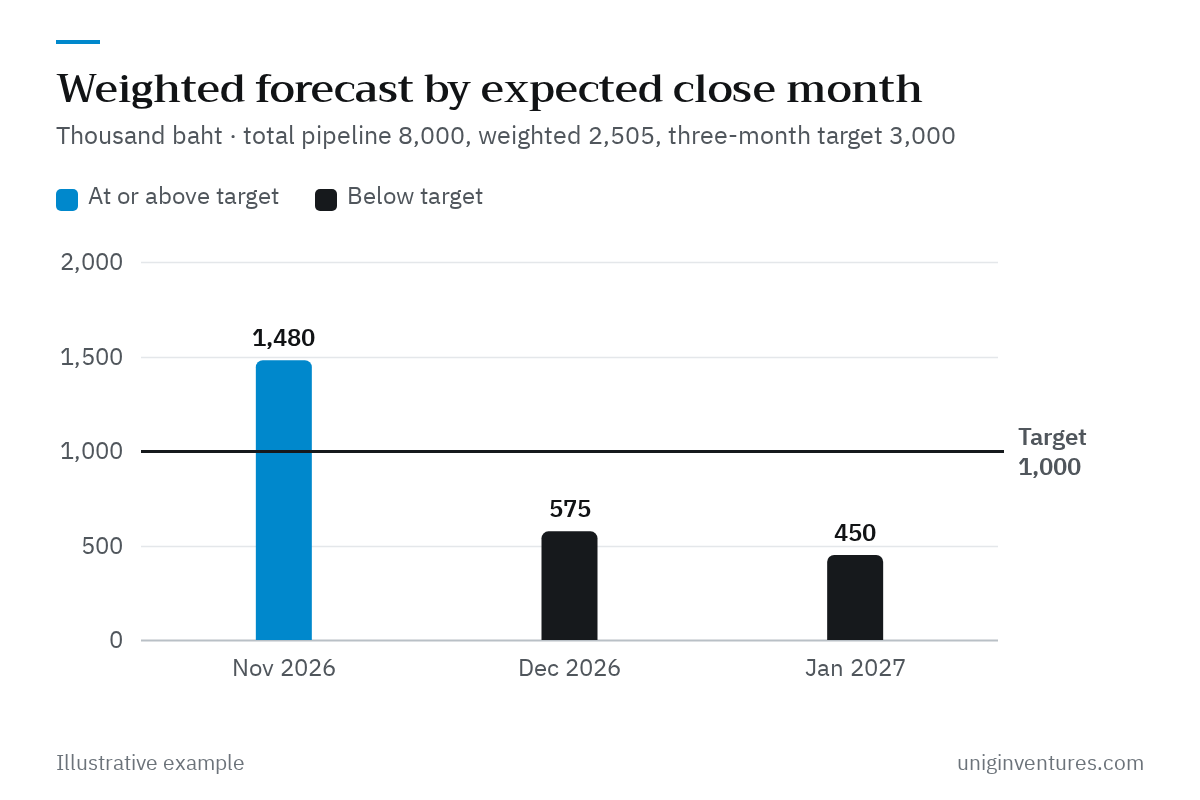
The picture is very different from the total. The weighted value of the whole pipeline is 2,505,000 baht, or about 2.5 million baht, which is 495,000 baht short of the three-month target. January has the highest full value at 3,600,000 baht, but only 450,000 baht after weighting.
A weighted figure is an average expectation, not a promise. With only a few deals, actual results swing widely. November looks above target, but 960,000 baht of it comes from deal A alone. If deal A slips to December, November's weighted forecast falls to 520,000 baht. So look at the value of deals already in negotiation, often called commit, alongside the weighted number. In this example all 1,600,000 baht of negotiation-stage deals fall in November, and December and January have none at all.
Calculate how much new pipeline you need
New pipeline needed = the month's gap ÷ the close probability of the stage where new deals enter
January's gap is 550,000 baht. If new deals enter at the demo stage (25%), you need 2,200,000 baht of additional deals. If they enter at the qualified stage (10%), you need 5,500,000 baht. And if this company's deals take about three months from qualified to won, deals that start after early November may not close by January anyway. Prospecting for January has to start now, not at the beginning of January. If your existing customers close faster than new ones, start with them.
The same logic tells you how large your pipeline should be relative to your target. Instead of a rule of thumb, use 1 ÷ the close probability of the stage you count from. Counting from the qualified stage (10%), you need a pipeline of 10 times the target. Counting from quotation sent (40%), you need 2.5 times.
Track accuracy every month
Record the forecast at the start of each month and compare it with what actually closed at month-end. Hyndman and Athanasopoulos's textbook Forecasting: Principles and Practice defines the forecast error as the actual value minus the forecast, and the percentage error as that error divided by the actual value.
Forecast error (%) = (actual − forecast) ÷ actual × 100
An illustrative example: in November only deal A closes, for 1,200,000 baht, while deals B and C slip to December. Against a forecast of 1,480,000 baht, the error is −23.3%, meaning the forecast was too high. One month tells you little, especially with a few large deals, so watch the trend. If the error stays negative month after month, your probabilities or close dates are too optimistic. Lower the probabilities, tighten the stage rules and go through the deals whose close dates have already been pushed back several times.
Where to start
- On one page, write down each stage and the evidence needed to move a deal into it.
- Pull the deals that ended in the past 12 months and calculate the close probability of each stage.
- Clean the current pipeline: fill in expected close dates and close out deals that have gone quiet.
- Build the weighted forecast by month in a spreadsheet or your CRM and compare it with the target.
- Calculate the new pipeline needed for months below target and start prospecting today.
- Compare forecast with actual every month and recalibrate the probabilities every quarter.
A closed deal is not yet revenue in your financial statements or cash in the bank. See revenue recognition for services, projects and subscriptions for when revenue is booked, feed the forecast into a 13-week cash flow forecast, and if one month depends too heavily on a single customer, read about customer concentration risk.
The company, deals and figures in this article are illustrative examples of the method.